Trusted local HTTPS for WampServer. One click. No more certificate warnings.
WAMP SSL Automator turns your http://myapp.test development sites into fully trusted https:// sites in seconds — a real local Certificate Authority your browser believes, Apache vhosts wired up for you, your hosts file updated, Apache restarted, and every domain verified end to end. If anything goes wrong, it rolls itself back.
Built for developers tired of clicking “Proceed anyway (unsafe)” twenty times a day.
- Free
- Open source
- MIT
- Windows 10 / 11
The problem
You already know this dance.
Modern web apps assume HTTPS. OAuth callbacks, secure cookies, service workers, SameSite=None, the Payment Request API, geolocation, camera access, HTTP/2 — half of them quietly refuse to work over plain http://. So you try to run your local sites over HTTPS, and you hit a wall:
NET::ERR_CERT_AUTHORITY_INVALID — Proceed anyway (unsafe)
- You generate a self-signed certificate, and the browser slaps a giant red “Your connection is not private” warning on it.
- You hand-edit httpd-vhosts.conf, fat-finger a directive, and Apache won’t start — now your whole stack is down.
- You forget to add the domain to your Windows hosts file, so it doesn’t resolve at all.
- You wrestle with OpenSSL incantations, Subject Alternative Names, Extended Key Usage flags, and the cryptic reasons Chrome rejects certificates that “look fine”.
- You finally get one site working, then have to do the whole thing again for the next project.
It is tedious, error-prone, and one wrong move takes your local environment offline. Most developers give up and click through the warnings forever. There is a better way.
The solution
The whole job, done correctly, in one click.
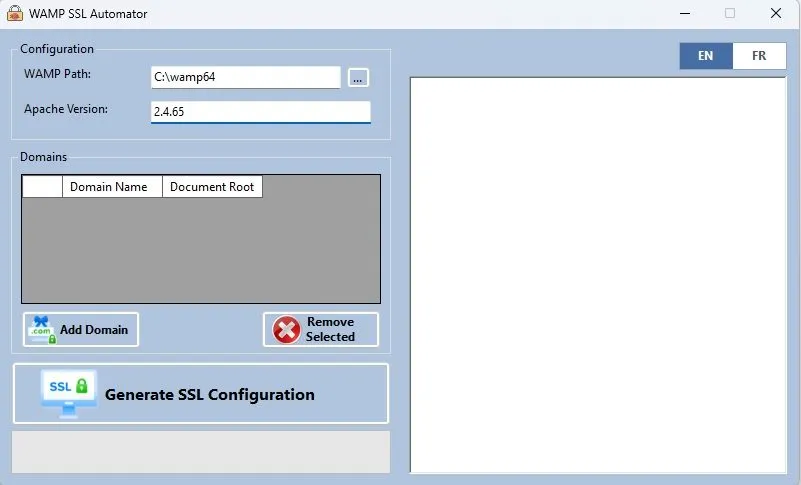
Point it at your WampServer install, type in the domains you care about, and press Generate SSL Configuration. In a few seconds you get:
It validates before it commits. The tool runs httpd -t first; if your config would not start, it never touches the running server.
It backs everything up. Your vhosts and hosts files are backed up, timestamped, every run.
It rolls back on failure. If Apache won’t restart, it restores the old files, restarts on the known-good config, and tells you exactly what happened — including the tail of the Apache error log.
You go from “no SSL” to “green padlock, verified” without opening a terminal, a config file, or OpenSSL once.
Why “trusted” is the whole point
Anyone can self-sign. Nobody trusts it — least of all your browser.
That red warning screen isn’t a formality. It is the browser correctly telling you the certificate has no chain of trust.
WAMP SSL Automator solves this the way professionals do. It creates one local Root CA on your machine and installs it into the Windows certificate store, exactly once. Every per-domain certificate it issues afterwards is signed by that CA. Because Windows — and therefore Edge and Chrome — trust the CA, they trust every certificate beneath it. No warnings. A real padlock. Green across the board.
The CA lives only on your machine. It never leaves, it is never uploaded anywhere, and it only signs the development domains you explicitly ask for. The same model the professionals use, applied to your WAMP stack with zero ceremony.
Your local Root CA
RSA-4096 · installed once · never leaves your machine
Features at a glance
Built like a tool you can trust with your config.
Every detail is here because doing it by hand is where things break.
Genuinely trusted certificates
A local Root CA in the Windows trust store. Browsers accept the certificates with no warning — not a yellow padlock, not an exception you click, an actual trusted connection.
Modern certificate profile
SHA-256 signatures, RSA-2048 domain keys, an RSA-4096 CA, SAN and EKU extensions, 825-day validity. Built to the spec Chrome and Edge enforce today, not the loose rules of a decade ago.
Idempotent — run it as often as you like
Re-running with the same domains is completely safe. The CA is reused, still-valid certificates are reused, and the managed blocks in your hosts and vhosts files are cleanly replaced. No duplication, no drift.
Merge, never clobber
Your existing httpd-vhosts.conf is preserved verbatim — your localhost block, your comments, your other projects. Only the domains you manage with this tool are touched, inside clearly marked sections.
Backups and automatic rollback
Every run timestamps a backup of both your vhosts and hosts files. If anything fails, the tool restores them and restarts Apache on the old config. Your environment is never left broken.
End-to-end verification
After restarting Apache, the tool fetches each domain over HTTPS using the same trust chain your browser uses. You don’t have to wonder if it worked — it tells you N/N OK.
Auto-detection
Finds your WAMP install (C:\wamp64 or C:\wamp) and reads your exact Apache version straight from httpd -v on startup. Almost nothing to configure.
One window, real-time log
A single desktop window. Add your domains, press the button, and watch the entire pipeline stream by line by line, so you see precisely what changed.
How it works
One click runs a careful nine-step pipeline.
Against your live WAMP install, in order — streamed to the on-screen log.
Quick start
Green padlock in five steps.
No terminal, no OpenSSL, no config files.
- 1 Download the latest release, or build from source with dotnet build -c Release.
- 2 Run as Administrator — the app self-elevates; click Yes at the UAC prompt.
- 3 Confirm your WAMP path — C:\wamp64 is filled in for you if it exists.
- 4 Add your domains — hostname plus document root, e.g. myapp.test → C:\wamp64\www\myapp\public.
- 5 Click Generate SSL Configuration and watch the log until you see Verification: N/N OK.
Open https://myapp.test. Green padlock. Done. To remove a domain later, take it out of the list and re-run — its managed vhost block and hosts entry are cleanly removed.

Where it comes from
Built by someone who sweats the details.
WAMP SSL Automator is built and maintained by Peter Bamuhigire — a developer who got tired of clicking through certificate warnings and decided to fix it once, properly, for everyone.
It is the kind of tool that comes out of a workshop where cloud systems, mobile apps, ERP platforms and custom software get built — and where the boring parts, the safety nets and the rollback paths, are treated as the interesting parts.
More about the project and the makerStop fighting certificate warnings.
Get trusted local HTTPS on your WAMP sites in one click — and get back to building.